

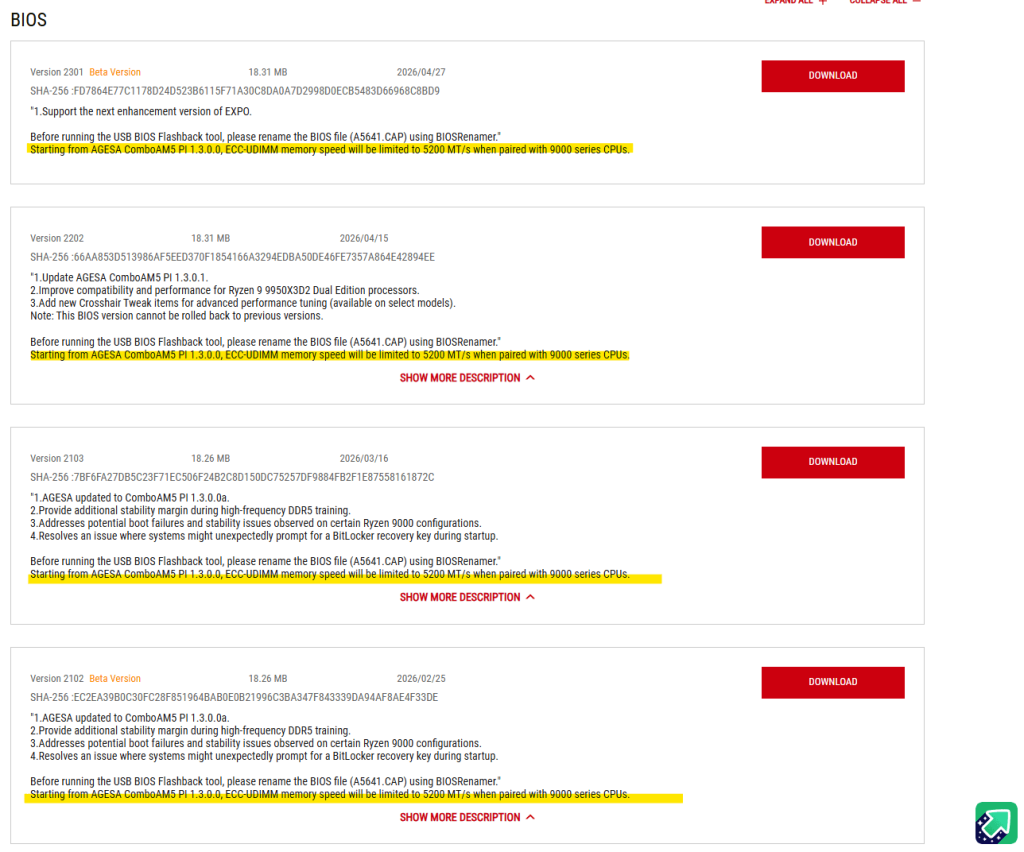
If your ECC UDIMMs dropped to 5200 MT/s on a Ryzen 9000 CPU after a BIOS update, update again. The cap came with AGESA 1.3.0.0, and BIOS builds on AGESA 1.3.0.1b, released from June 2026, let you set DDR5-5600 again. Two things are different from before: the board still boots at 5200 MT/s on default settings, and you have to set 5600 by hand.
That matters because DDR5-5600 is AMD’s own spec. AMD’s Ryzen 7 9700X page lists DDR5-5600 for two DIMMs, single or dual rank, DDR5-3600 for four, and ECC support “Yes (Requires mobo support)”. A 5200 lock on two ECC sticks put the CPU below its rated memory speed.
What happened, by date
| When | What | Source |
|---|---|---|
| January–March 2026 | BIOS builds on AGESA 1.3.0.0 and 1.3.0.0a ship | ASUS BIOS notes |
| 7 April 2026 | First reports: Kingston DDR5-5600 ECC on a ProArt X870E and a 9950X3D boots at 5200 after BIOS 2004/2103, fine on 1805 | Level1Techs forum |
| Late April 2026 | ASUS adds “ECC-UDIMM memory speed will be limited to 5200 MT/s when paired with 9000 series CPUs” to its AM5 BIOS notes | ASUS BIOS notes |
| 11 June 2026 | Users and Level1Techs’ Wendell confirm 5600 can be set manually again on AGESA 1.3.0.1b beta BIOS | Level1Techs forum |
| 17 June 2026 | ASUS ProArt X870E-Creator BIOS 2306: AGESA 1.3.0.1b, “Optimize ECC-UDIMM memory performance”, 5200 note gone | ASUS BIOS notes |
| July 2026 | ASRock X870E Taichi users report 5600 back on BIOS 4.41 | Level1Techs forum |
Sources: ASUS ProArt X870E-Creator WiFi BIOS page, ASUS TUF Gaming B650-E WiFi BIOS page, Level1Techs forum thread (all read 29 October 2026).
Who was affected
Ryzen 9000 (Zen 5) CPUs with ECC enabled. In the Level1Techs thread, one user swapped a 7800X3D for a 9700X on the same ASRock DeskMeet X600 and saw the lock appear only with the Zen 5 chip. Ryzen 7000 CPUs kept running ECC memory at the speed set in BIOS. Reports came from ASUS, ASRock and Gigabyte boards, which points at AMD’s AGESA, the firmware every board maker builds on, rather than one vendor. One Gigabyte owner saw it on a BIOS built on AGESA 1.2.8.0, so the exact first version isn’t certain.
On ASUS’s TUF Gaming B650-E WiFi page, the 5200 note sits under every BIOS from January 2024 to April 2026 and is missing from BIOS 3881 (AGESA 1.3.0.1b, 29 June 2026) onward.
How to get DDR5-5600 back
- Update to a BIOS on AGESA 1.3.0.1b or newer. ASUS’s current builds are on 1.3.0.1d (ProArt X870E-Creator BIOS 2503 and TUF Gaming B650-E BIOS 4004, both September 2026). Check your board’s support page for the AGESA version in the notes.
- Load defaults once, then set the memory frequency by hand. Wendell reported in the thread that after loading setup defaults, his ASUS board showed 5600 in BIOS but booted at 5200. Setting 5600 manually, then save and exit, held from both warm and cold starts.
- Check the speed the system actually runs at, not the one BIOS shows. On Linux,
dmidecode -t memory; on Windows, HWiNFO or ZenTimings. Thread users found the BIOS screen and the running speed can disagree. - Check that ECC is still on. One user’s check in Windows PowerShell:
Get-CimInstance Win32_PhysicalMemoryreports a TotalWidth of 72 and a DataWidth of 64 on each ECC stick. If both read 64, ECC isn’t active, and a board with ECC set to Auto may have turned it off.
Rolling back is not the answer. ASUS marks BIOS 3854 for the TUF Gaming B650-E, its AGESA 1.3.0.1 build, as one that “cannot be rolled back to previous versions”. Once it’s installed, a BIOS from before the cap is out of reach on that board.
If you’re picking memory for a new AM5 build rather than ECC for a workstation, our guide to AMD EXPO ULL memory covers the low-latency profiles that the same AGESA 1.3.0.1b BIOS builds added.
What we couldn’t confirm
We haven’t tested any of this on our own hardware. The fix rests on ASUS’s notes and on user reports in one forum thread, across several boards. AMD hasn’t published a statement on its own site that we could find; users in the thread quote an AMD overclocking engineer on Reddit, which we couldn’t open. Whether the lock was a mistake is also open: one DeskMeet X600 owner reported L3 cache errors on a 9700X at DDR5-5600 under stock settings on the fixed BIOS, and the same machine with a 7800X3D ran clean. That’s a single report. We found no measured gaming or workstation difference between ECC at 5200 and 5600 on Ryzen 9000 that we could open, so we don’t put a number on what the cap cost.
Our pick
Our pick: update to a BIOS on AGESA 1.3.0.1b or newer, set DDR5-5600 manually, then confirm the running speed and ECC status from the operating system. If you see errors at 5600, go back to 5200 and keep ECC on.
Skip it if you run four ECC sticks: AMD’s spec for four DIMMs is DDR5-3600, so the 5200 cap never applied to you.

3 thoughts on “Ryzen 9000 ECC RAM Stuck at 5200 MT/s: The AGESA Fix”
Comments are closed.